Troubleshooting Collector Fields
This topic helps administrators resolve errors for the Collected Fields caused by misconfiguration or missing components by identifying issues, understanding their causes, and applying practical steps.
Registry Value Collector
| Issue/Error | Cause | Resolution |
|---|---|---|
| Invalid or unknown registry hive. | The registry hive name specified in the collector configuration is invalid, misspelled, or does not exist. |
|
| Registry Subkey or Value Not Found. | The specified registry subkey or value does not exist on the device. |
|
| Unsupported data type or conversion. | Collector does not support the registry type. |
Supported registry value types:
Unsupported registry value types:
|
Additional Notes:
- A 'Not found' warning may be expected if the software is not installed on the device.
- Supported Data Type Conversions: The Registry Collector can convert certain registry value types into specific data formats. Below are the supported conversions:
- For REG_SZ / REG_EXPAND_SZ:
- String
- Version (if a valid version format is found)
- Date (if a valid format is found)
- Date Time (if a valid format is found)
-
For REG_DWORD / REG_QWORD:
- Number
- Boolean
- Date (if a valid numeric file time is found)
- Date Time (if a valid numeric file time is found)
- For REG_SZ / REG_EXPAND_SZ:
- If conversion fails, verify the format of the registry value.
File/Folder Collector
| Issue/Error | Cause | Resolution |
|---|---|---|
| File or Folder Not Found. | The specified file or folder path does not exist on the target device. |
|
| Missing File Details (Not Found error for missing metadata). | The file exists, but the requested details (for example, version information) are not available. |
|
Additional Notes:
- The collector returns a Boolean type if metadata is found; otherwise, it gives 'Not found' error. An error can be expected if the file is optional or device-specific.
- Only valid application bundles located in the Applications directory or /System/Application will return version information.
Process Exists Collector
| Issue/Error | Cause | Resolution |
|---|---|---|
| Incorrect name or missing extension. | The file extension is missing or incorrect. |
|
Additional Notes:
- The collector checks the exact process name from Task Manager > Details, including the .exe extension.
- If the extension is missing, the collector will always return process not found error.
Service Collector
| Issue/Error | Cause | Resolution |
|---|---|---|
| Process does not exist. |
|
|
Additional Notes:
- On Windows, the collector accepts either the Service name or the Display name as shown in the Services console.
- On macOS, the collector requires the fully qualified daemon identifier, such as com.apple.background.task.
Plist Entry Collector
| Issue/Error | Cause | Resolution |
|---|---|---|
| Unsupported data type (dict/array) |
Collector does not return complex container types.
|
The collector converts only supported primitive types. Composite types must be dereferenced before they can be processed.
Request concrete property type: string, date, integer, real, or Boolean |
| Invalid path syntax |
|
|
| Version parsing fails | The string does not match a valid version pattern. | Provide a version-like string (for example, 1.2.3) |
| Invalid date format | The date value is not in a recognized format. | Ensure the Plist date uses a valid format. |
| Value not found at the specified path |
|
Verify the exact key names and indexes. |
WMI Property Collector
| Issue/Error | Cause | Resolution |
|---|---|---|
| Unsupported data type or conversion | Requested type does not match WMI property type. |
|
| Comparison failed (or value does not match) | Mismatch between reference type and the actual WMI property type (for example, treating numeric as string); value typo; whitespace. | Confirm the WMI property type; set Reference Type accordingly (String/Number/Boolean/Date). |
Additional Notes:
- Supported conversions include:
- String to String/Version/Date.
- Numeric types to Number or Boolean.
- Unsupported conversions will result in an error that requires configuration changes.
Evaluating Collected Data
| Issue/Error | Cause | Resolution |
|---|---|---|
| Mismatch between reference type and collected type | Reference are set incorrectly (for example, Number vs String) | Match reference type to collected data and use correct operator (Equals, Contains). |
Additional Notes:
- Supported collectors for evaluation include Registry Value, Plist Entry, and WMI Property.
- Ensure that the data types String, Number, and Boolean match the collected data type.
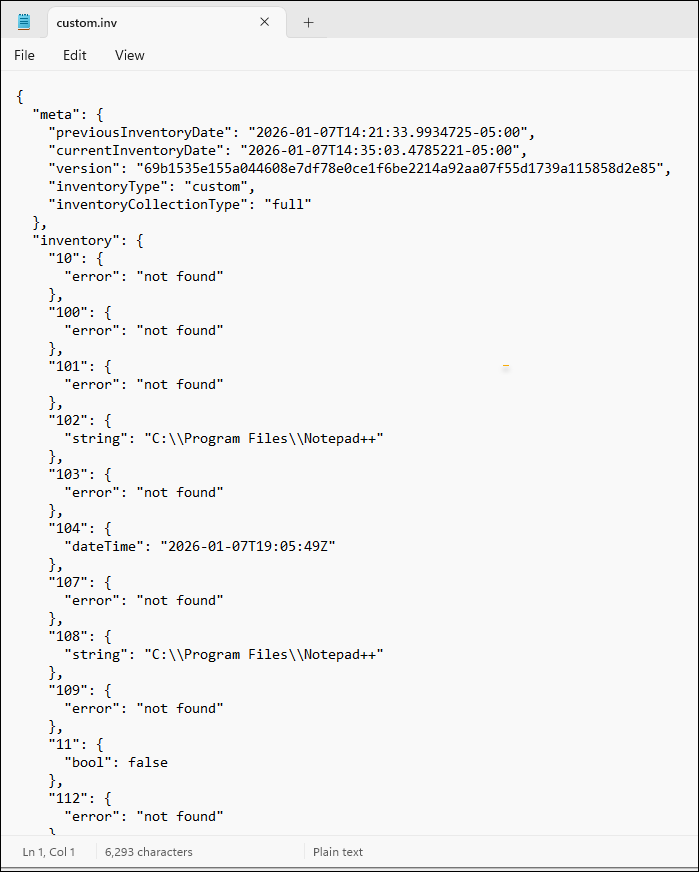
Collector Errors in the Custom.inv file
When collectors fail to return expected results, review the Custom.inv file for error messages. This file contains the output of all custom collectors, including successful values and errors.
Location of Inventory Files:
- For Windows: C:\ProgramData\Quest\KACECloud\cloudinventory\
- For Mac: /Library/Application Support/Quest/KACECloud/data/cloudinventory
Key files:
- Policy.mnf: Contains collector definitions.
- Custom.inv: Contains collected values and error details.
How to Troubleshoot
- Open the Custom.inv file and search for the collector ID to locate its result.
- Check for error messages associated with the collector.
- Validate the following:
- Collector type and configuration.
- Registry/file paths.
- Agent permissions.
- Correct the configuration and re-run inventory.
Example of Custom.inv file: